






User experience basics (UX) is the heart of every successful website, app, or digital product. In simple terms, UX design is about how people feel and interact when using a product. Good website UX makes a site intuitive, enjoyable, and efficient. On the other hand, poor UX frustrates visitors, increases bounce rates, and reduces conversions.
In today’s digital world, users expect seamless experiences. If your website is slow, confusing, or cluttered, visitors will quickly leave. That’s why understanding user experience basics is essential—not just for designers, but for business owners, marketers, and anyone building digital products.
What is User Experience (UX)?
User experience is more than just design. It’s the overall perception someone has while interacting with a product or service. This includes:
- Ease of navigation
- Visual appeal
- Speed and performance
- Accessibility
- Emotional satisfaction
For example, if a shopping website is easy to navigate and checkout is simple, users are more likely to buy. If the process is confusing, they will abandon the cart.
In short, good UX solves user problems efficiently while creating a positive feeling.
Key Principles of UX
Understanding the core principles helps beginners build better digital experiences.
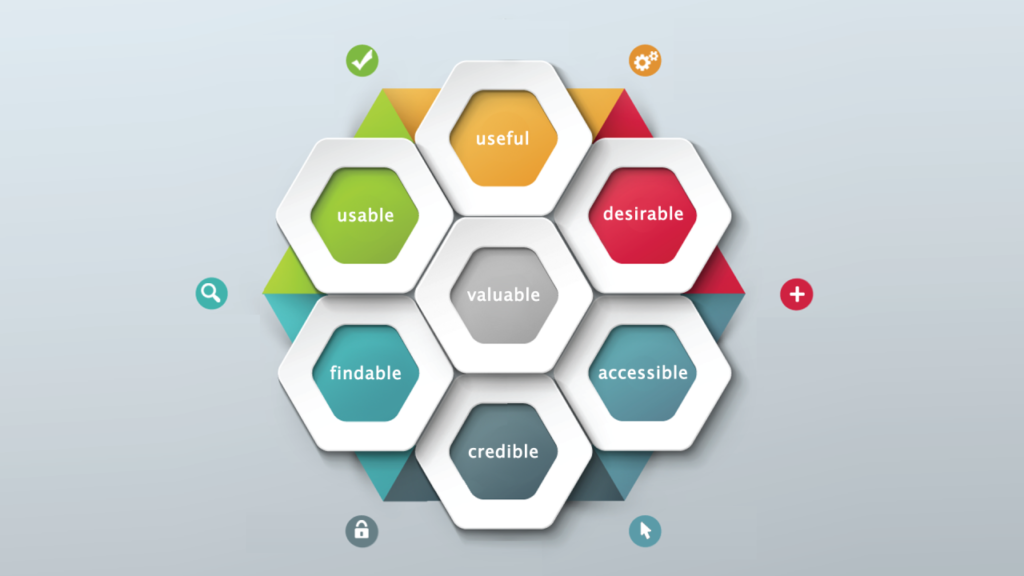
- Usability
Users should find your website or app simple to use. Every feature must be intuitive. Clear buttons, readable text, and logical flow are essential. - Accessibility
Good UX is for everyone. This includes people with disabilities. Use readable fonts, alternative text for images, and proper color contrast. - Consistency
Consistency builds trust. Buttons, menus, and design patterns should behave the same throughout the product. - Feedback
Users need feedback. Whether it’s a loading spinner, confirmation message, or error alert, feedback shows that the system is responsive. - Visual Hierarchy
Guide users’ attention to what matters most. Headlines, images, and buttons should create a clear path for actions. - User-Centered Design
Design decisions should be based on user needs, not just personal preference. User research is crucial to understand behavior.
Types of User Experience
UX can be broken into several types depending on focus:
- Interaction UX – How users interact with buttons, forms, and links.
- Information UX – How easily users find and understand content.
- Visual UX – How colors, layout, and design elements affect perception.
- Accessibility UX – Ensuring the product is usable for people with disabilities.
- Service UX – The overall experience beyond the interface, including customer support.
The UX Design Process: Step by Step
Creating a great UX is a structured process. Beginners should follow these steps:
Step 1: Research
- Identify your target users
- Understand their goals, challenges, and behaviors
- Use surveys, interviews, or analytics
Step 2: Create Personas
- Represent typical users with demographics, goals, and frustrations
- Helps in designing for real people, not assumptions
Step 3: Information Architecture
- Organize content logically
- Create sitemaps or user flows to plan navigation
Step 4: Wireframing
- Sketch layouts for pages or screens
- Focus on placement of elements and functionality
Step 5: Visual Design
- Add colors, fonts, and graphics
- Maintain consistency and clarity
Step 6: Prototyping
- Create interactive mockups
- Allow users to test navigation before full development
Step 7: Usability Testing
- Observe real users interacting with the product
- Identify pain points and fix them
Step 8: Launch and Iterate
- Release the product
- Continuously gather feedback and improve UX
UX Tools & Techniques for Beginners
Several tools make UX design easier, even for beginners:
- Wireframing & Prototyping: Figma, Sketch, Adobe XD
- User Testing: Maze, UserTesting
- Analytics: Google Analytics, Hotjar
- Feedback Collection: Typeform, SurveyMonkey
Additionally, techniques like A/B testing, heatmaps, and journey mapping help identify issues and improve user satisfaction.
Common UX Mistakes to Avoid
Avoiding mistakes early saves time and improves results:
- Cluttered design – Too many elements confuse users
- Slow loading pages – Users leave within seconds
- Ignoring mobile users – Mobile-first design is crucial
- Unclear navigation – Menus should be simple and intuitive
- Lack of feedback – Users need to know if actions succeed or fail
Fixing these mistakes ensures a smoother, more enjoyable experience.
Benefits of Good UX
Investing in UX yields measurable results:
- Higher conversions – Easy navigation boosts sales
- Lower bounce rates – Users stay longer on your site
- Customer loyalty – Positive experiences increase retention
- SEO boost – Google ranks user-friendly websites higher
- Brand reputation – Good UX makes your brand trustworthy
How to Measure UX
You can evaluate UX using:
- User Feedback – Surveys, ratings, and interviews
- Analytics Metrics – Bounce rate, session duration, page views
- Task Success Rate – Can users complete actions easily?
- Error Rate – How often do users make mistakes?
- Net Promoter Score (NPS) – Measures overall satisfaction
Quick Action Checklist (For Beginners)
✅ Research your target audience
✅ Create simple, consistent layouts
✅ Focus on usability and accessibility
✅ Test with real users before launch
✅ Monitor analytics and iterate
✅ Use visuals and hierarchy to guide actions
✅ Prioritize mobile experience
✅ Avoid clutter and distractions
Final Thoughts
User experience is not just for designers. Anyone creating digital content or products must understand user experience basics. A well-designed UX improves engagement, trust, and conversions while reducing frustration.
Start small, test often, and always focus on real user needs. Over time, even beginners can create experiences that feel intuitive, enjoyable, and professional.
Frequently Asked Questions (FAQ)
Q1: What is UX design?
UX design is the process of improving a user’s experience with a product, focusing on usability, accessibility, and satisfaction.
Q2: Why is UX important for websites?
Good UX increases engagement, reduces bounce rates, improves conversions, and builds trust.
Q3: Do I need design skills for UX?
No, basic understanding of user needs, testing, and clear layouts is enough to start.
Q4: How can beginners learn UX?
Start with simple tools like Figma, read UX blogs, and practice on small projects.
Q5: How do I measure UX effectiveness?
Use analytics, task completion rates, feedback surveys, and usability testing.