





Cutout Pro is an AI-powered online tool that helps you remove backgrounds, enhance photos, and create professional-looking images without design skills.
Today, visual content plays a major role in online success. However, many beginners struggle with photo editing tools like Photoshop because they feel complex and time-consuming.
Because of this, Cutout Pro has become popular among content creators, small business owners, and eCommerce sellers.
Moreover, it allows you to create clean product images and social media visuals in just a few clicks.
In this guide, you will learn what Cutout Pro is, how it works, who should use it, and whether it is worth your time in 2026.
What Is Cutout Pro?
Cutout Pro is an AI-based image editing platform that automatically removes image backgrounds and enhances photos.
Instead of spending hours learning design software, you can upload an image and get a clean result instantly.
Furthermore, the tool uses advanced machine learning to detect objects, people, and products with high accuracy.
What Cutout Pro Can Do
Cutout Pro offers multiple features for image editing:
- AI background remover
- Photo enhancer and upscaler
- Face cutout and portrait editing
- Object remover
- Cartoon and creative effects
As a result, users can create professional visuals without hiring a designer.
Why Cutout Pro Is Popular in 2026
Image-based content is growing fast.
Therefore, tools that simplify design work are in high demand.
Here’s why Cutout Pro stands out:
- It saves time for beginners
- It works directly in your browser
- It does not require design skills
- It supports eCommerce and social media content
- It uses AI to improve quality automatically
Moreover, many freelancers and small businesses use Cutout Pro to speed up their workflow.
How Cutout Pro Works (Step-by-Step)
Using Cutout Pro is simple and beginner-friendly.
Step 1: Upload Your Image
First, visit Cutout Pro and upload your photo.
Step 2: Let AI Process the Image
Next, the AI automatically detects the background and main subject.
Step 3: Edit or Enhance
Then, you can refine edges, enhance quality, or remove unwanted objects.
Step 4: Download the Final Image
Finally, download the clean image for your website, store, or social media.
Because the process is automated, you can finish editing in under one minute.
Who Should Use Cutout Pro?
Cutout Pro is useful for many types of users.
Best For:
- eCommerce store owners
- Social media creators
- Bloggers and website owners
- Freelancers and marketers
- Small business owners
However, professional designers may still prefer advanced software for complex designs.
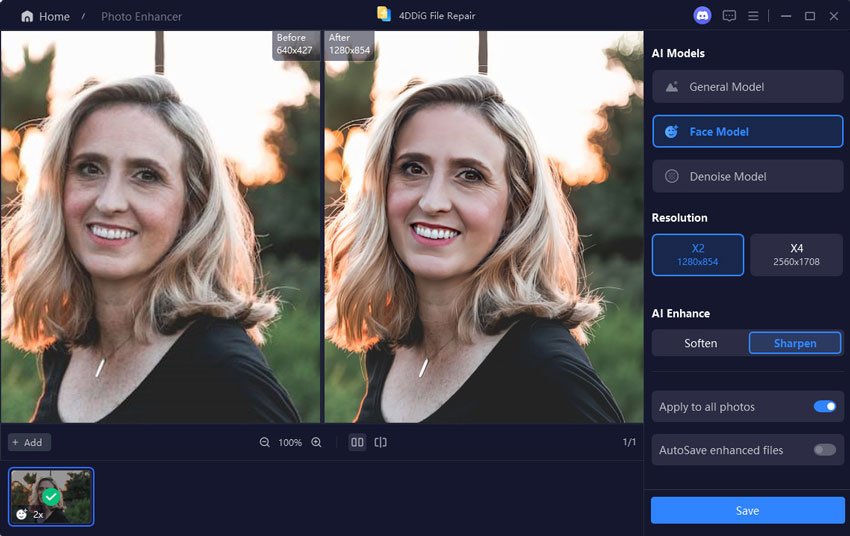
Cutout Pro Features Explained
1. AI Background Remover
This feature removes image backgrounds with one click.
Moreover, it works well for product photos and portraits.
2. Image Enhancer
Cutout Pro improves low-quality images.
As a result, your visuals look sharper and more professional.
3. Object Remover
You can remove unwanted objects from photos.
Therefore, your images look clean and distraction-free.
4. Portrait Editing
The tool can enhance faces and improve lighting.
In addition, it helps create better profile images.
Pros and Cons of Cutout Pro
✅ Pros
- Easy to use
- No design skills required
- Fast AI processing
- Useful for beginners
- Supports multiple image tools
❌ Cons
- Free version has limits
- Internet connection required
- Less control than Photoshop
However, for most beginners and small businesses, these limits are not a major problem.
Cutout Pro vs Photoshop (Quick Comparison)
| Feature | Cutout Pro | Photoshop |
|---|---|---|
| Ease of use | Very easy | Complex |
| Learning curve | Very low | High |
| Background removal | One-click AI | Manual or AI |
| Best for beginners | Yes | No |
| Time required | Seconds | Minutes to hours |
Therefore, Cutout Pro is better for speed and simplicity, while Photoshop is better for advanced editing.
Is Cutout Pro Free or Paid?
Cutout Pro offers both free and paid plans.
- Free users get limited credits
- Paid plans unlock higher quality downloads
- Business users can choose premium plans
Because of this, beginners can test the tool before upgrading.
Is Cutout Pro Safe to Use?
Yes, Cutout Pro is safe for normal image editing.
However, you should avoid uploading private or sensitive images.
Moreover, always read the privacy policy before using any online tool.
SEO Use Cases of Cutout Pro (For Website Owners)
Cutout Pro is useful for SEO-focused websites:
- Create clean featured images
- Improve product photos for eCommerce
- Make Pinterest and social thumbnails
- Reduce image size while improving quality
As a result, your website loads faster and looks more professional.
Best Practices When Using Cutout Pro
- Use high-quality original images
- Avoid blurry photos
- Crop before uploading
- Check final edges manually
- Compress images before uploading to your site
Therefore, you get the best results with minimal effort.
Final Verdict: Is Cutout Pro Worth It?
Cutout Pro is a powerful AI tool for beginners, bloggers, and small businesses.
Although it cannot fully replace professional design software, it covers 80% of basic needs.
In conclusion, if you want fast, simple, and affordable image editing, Cutout Pro is worth using in 2026.
Frequently Asked Questions (FAQ)
What is Cutout Pro used for?
Cutout Pro is used to remove image backgrounds, enhance photos, and create professional visuals using AI.
Is Cutout Pro good for beginners?
Yes, Cutout Pro is beginner-friendly and does not require design experience.
Can I use Cutout Pro for eCommerce images?
Yes, many sellers use Cutout Pro to create clean product images.
Is Cutout Pro better than Photoshop?
For quick edits, Cutout Pro is easier. For advanced design, Photoshop is better.
Does Cutout Pro work on mobile?
Yes, Cutout Pro works on mobile browsers, but desktop gives better control.